
diados
Extension of the Day

diados

5.0 FREE
  • Screenshot 1

Description

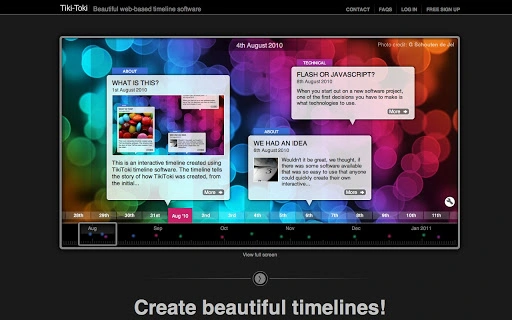
Tiki-Toki is a web-based timeline maker that makes it dead easy for people to create interactive multimedia timelines in their browsers. Images, text and even videos (YouTube, Vimeo and MP4s) can be embedded in Tiki-Toki timelines.The timelines created with Tiki-Toki can be shared with families, friends and business contacts, and if you haved signed up with one of our paid-for accounts, you can also embed your timelines on your own blog or website.Tiki-Toki offers a free account that allows users to create a fully-functional timeline. Premium accounts (from $5 to $20 a month) offer the ability to create more timelines and to embed the timelines on websites.Tiki-Toki provides loads of customisation options to help you create a unique look for your timeline. There are four different view types and numerous spacing options, providing a wide range of ways to display your timeline events.Events can be split into categories and those categories can be color coded. You can customise the colors used for the timeline interface, allowing you to create a timeline that matches your brand or shows off your creativity and originality.Tiki-Toki comes with event filtering and search built-in. The software also allows you to customise how dates appear (ie display dates only as year) and there is even the option of generating timelines from Twitter, YouTube and RSS feeds.Here's some ideas for what you can do with Tiki-Toki:A history of your companyHas your company got an illustrious history. Highlight some if its past achievements with a Tiki-Toki timelineThe life of a famous artist or musicianIs there an artist or musician whose work you love. Why not create a timeline of their lifeA history of your familyYou can even include your photo albums and videos in the timelineA personal diaryKeep track of your thoughts over a period of time using Tiki-TokiSchool projectsTiki-Toki is perfect for teachers and their pupils to explore key events in historyPresentationsTiki-Toki can be used as a unique time-based presentation tool

Guides & Tutorials for Tiki-Toki Timeline Software App for Chrome

How to install Tiki-Toki Timeline Software App for Chrome
  1. Click the Preview / Download button above.
  2. Once redirected, accept the terms and click Install.
  3. Wait for the Tiki-Toki Timeline Software App for Chrome download to finish on your device.
How to use Tiki-Toki Timeline Software App for Chrome

This software is primarily used for its core features described above. Open the app after installation to explore its capabilities.

User Reviews for Tiki-Toki Timeline Software App for Chrome 0

    No reviews found

Similar Apps


